
For parents
Your child learns more independently. You can see whether real progress is happening.
EduAssistant structures your child's everyday learning, keeps revision on track, and gives you a simple progress overview without sitting through every lesson.
- The child gets courses, quizzes, materials, and revision in one place.
- You quickly see what is done and where it is worth returning.
- You do not need to rebuild the learning plan from zero or guess whether anything is really moving forward.
In one place, you check the child's progress, subscription status, and whether the system is guiding the most important revisions.
What the parent account gives you
You are not only buying access for the child. You are buying a clearer view of the whole learning process.
Less reminding about everything
The child gets ready-made courses, quizzes, and materials, so learning less often starts with asking what to do now.
Visibility instead of guessing
You do not need to inspect every task separately. In the parent panel you see a summary of the child's work and notice slowdowns more easily.
Regularity between tests
The system reminds the child about the most important revisions, so learning is not based only on last-minute bursts.
One place instead of several tools
Courses, materials, quizzes, and revision are structured in one platform. The child searches less and you get less chaos around learning.
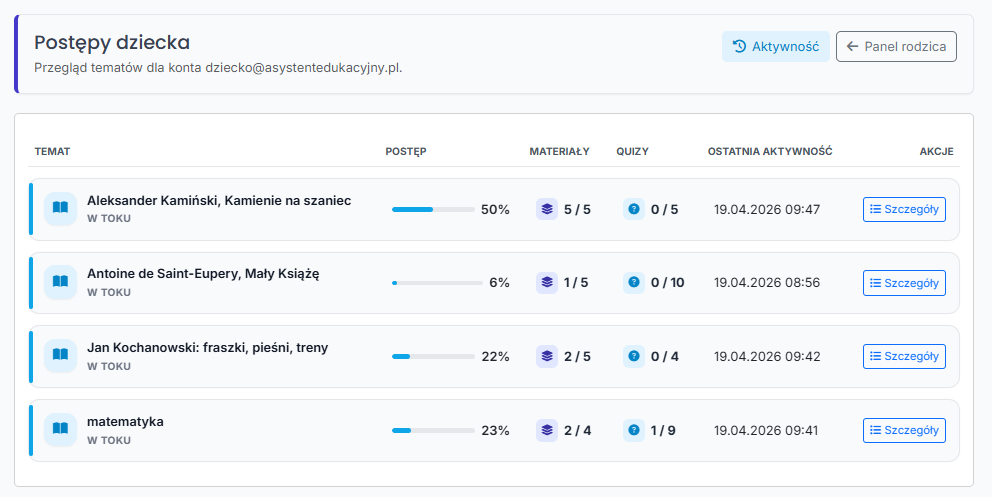
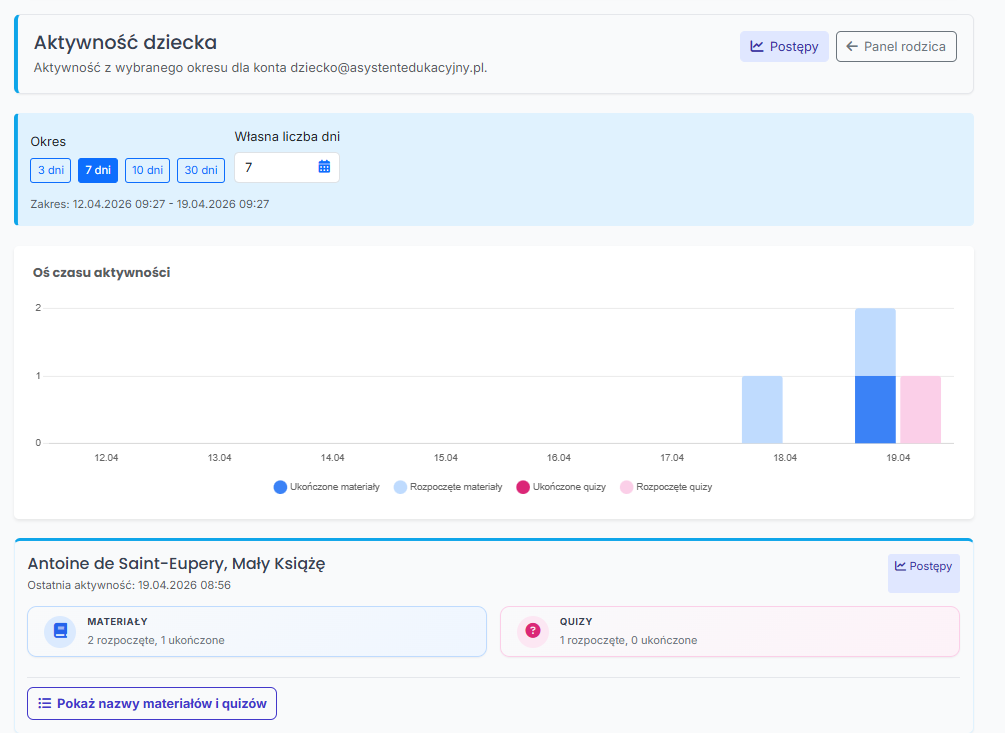
Panel preview
Two clear views of your child's progress.
Check overall topic progress first, then see when your child actually worked with materials and quizzes.
How it works
A simple setup: the child works, the system saves progress, and you get an overview.
You create a parent account
You create an account from which you can manage the linked child account and check current activity.
The child uses courses and topics
They get one place for materials, quizzes, chat, and revision instead of jumping between a few sites.
The system stores progress and gaps
The student returns mainly to topics that still need work, not to everything from the beginning.
You react only when it matters
You get a clear picture of the child's learning and can step in when there is a slowdown or time pressure.
What the child gets
Tools that help the child work more concretely and more calmly.
Courses and topics in one place
The child moves from planning to learning faster because they do not have to assemble everything from the beginning.
Chat grounded in lesson materials
The child can ask about what they do not understand without wandering through random answers on outside websites.
Quizzes and individual revision
The system helps strengthen what still needs work instead of only checking off more material.
Memory of progress
Learning does not start from zero every time, because the platform remembers what has already been done and what is worth revisiting.
Where to begin
The easiest start is a ready-made course. If the child is preparing for the Grade 8 exam, begin with the Grade 8 course.
A ready-made course gives the child a concrete direction from the first visit. Instead of improvising day by day, they immediately see what they can use and how to learn more regularly.
When it helps most
Especially when learning starts slipping or an important deadline is getting closer.
Before a test
The child returns to the topic more quickly, and you gain more confidence that everything is not being postponed until the last evening.
Before the Grade 8 exam
A ready-made course structures preparation and gives a clearer everyday rhythm instead of improvisation.
When learning is irregular
Revision, saved progress, and one panel help the child return to learning more systematically and more calmly.
Next
Create a parent account and see how your child's learning can become more organized.
If you want to first see what the child will use, browse the courses. If you already know that you need better visibility and less chaos, start with the parent account.